Whats the difference between Z-Wave and Z-Wave Plus?

There is a lot of confusion between Z-Wave Plus and older non-Plus devices.

Z-Wave_Plus_Badge_RGB_v3.1A product that is Z-Wave Plus means it has passed a rigorous certification process and thus is likely to be more reliable and have fewer issues than non-Plus devices. All Z-Wave devices are 100% interoperable and backwards compatible so a Z-Wave Plus device can communicate with any non-Plus device without issue. If you have a choice between a Z-Wave Plus device and a non-Plus device, I recommend you choose the Z-Wave Plus device because the Plus device will work better.

Z-Wave History Lesson

The timeline shows the technology trajectory that Z-Wave has traveled since its inception in 2002.ZWaveTimeLineThe timeline shows the constant improvement and evolution of Z-Wave. Initially the data rate was only 9600 bits per second. This was fast enough to turn a light or two on or off but as things progressed and you want to slowly change the color of a dozen or more bulbs, then you need a faster data rate. Thus, the increase to 40K with the 300 series and 100K with the 500 series. There are many other enhancements along the way including longer range, better RF sensitivity, lower power, more peripherals and in particular the AES encryption engine. The amazing thing though all of these improvements is that they have all remained 100% backward compatible. Even the latest chips can talk to the early 100 series chips. Granted it is only at the slower 9600 bps but it still works! So the lamp dimmer you bought in 2004 is still able to talk to the latest SmartThings hub.

The Curse of the Even Series

Z-Wave has had some mistakes along the way, after all no one is perfect. Much like the Star Trek Movies, all of the even series chips were flawed and quickly obsoleted. The developers became so fearful of the curse of the even series they skipped the 600 series and jumped straight to 700. The 200 series chips were simply buggy. Period. They had some significant power issues making them difficult to use as a battery powered device among other problems. The flaws were quickly fixed and the series replaced with the largely firmware compatible 300 series which had a long and plentiful life. Many 300 series devices are still in the market though the chips have reached end-of-life so there are limited inventories left. A small number of 300 series chip based devices are Z-Wave Plus – but that number is quite small and there are probably none left on the shelves though you could have one installed in your home. Fortunately, as we’ve seen they are all completely interoperable so no problem there.

The 400 series suffered from a marketing mistake early on – the memory that holds the firmware is One-Time-Programmable (OTP). This means the firmware cannot be updated – EVER. You burn it once, and pray it is good. This is a nightmare for developers as they have to replace the chip every time they make a new firmware build, which they typically do hundreds of times per day. While the OTP saves a fraction of cent in the cost of the chip, the drawbacks far outweigh that tiny cost.  Fortunately we developers didn’t have long to wait and the 400 series was replaced with the 500 series. The 500 series had plenty of FLASH and added the ability to update the firmware in the device even after it is installed in the field using a technique called Over-The-Air (OTA) firmware update.

Z-Wave Security – AES Encryption

One of the most important IoT devices is a door lock. Naturally, a door lock needs to be secure. Up until 2008, Z-Wave was “in the clear” meaning it wasn’t secure at all. The Security Command Class was added to encrypt all communication with banking quality AES-128 encryption which makes Z-Wave secure – or so the Z-Wave developers thought.

In 2013 it was widely published that the Z-Wave security has a weakness when a device is first joined to a network. During that process, the encryption “key” is sent to the device over the radio and it is encrypted, but the encryption key is 128 bits of 0. Since the encryption key is all zero, it is possible for someone with very sophisticated equipment to “sniff” the radio data and thus obtain the key to every secure device in the network. While this is a security hole, it requires a lot of equipment on-site at the short time when the user is adding a secure device to the network. Much easier for a burglar to throw a brick thru a window to gain access vs. hacking a Z-Wave door lock. But Z-Wave had to counter with an improvement and they did just that in 2015 – with the updated Security S2 command class.

Security S2 adds full diffe-hellman symmetric encryption to the key exchange. A number of performance improvements were also made which enables battery powered devices to be secure without spending extra time exchanging secrets back and forth. All devices certified after April 2017 are required to support Security S2.

The question of Z-Wave Plus vs. Non-Plus however is independent of Security. Since new devices have to implement Security and they are Z-Wave Plus certified, it seems like the two go together but in reality they are independent. But all new devices will have both which is good. Fortunately support for Security S2 isn’t required to be supported by Hub vendors like SmartThings, Vera, HomeSeer, etc. They will need to add support but all your older non-secure devices will remain 100% backward compatible.

The Future

Z-Wave continues to evolve and improve but continues to remain 100% backward compatible all the way back to 2002 and the initial release of the 100 series transceivers. The Z-Wave Certification program continues to be strengthened with new features and new tests that make every Z-Wave certified product better and completely interoperable with every other Z-Wave device on the market. Interoperability is the advantage Z-Wave has over the many other competing wireless protocols for IoT.

Newer devices have been tested more rigorously and use the latest chip sets for better RF range and mesh network routing algorithms. So given the choice it’s generally better to buy newer devices using the latest technology.

Conclusion

Choose a Z-Wave Plus device over a non-Plus device even if you have to pay a little more. A Z-Wave Plus device uses the 500 series chips with the latest RF technology and firmware and has been tested under the Z-Wave Alliance Certification program which is quite difficult to pass. Rest assured that the Z-Wave device you purchase today will continue to be interoperable with future versions of Z-Wave technology for the foreseeable future.


EU Z-Wave Summit 2018 – Amsterdam

2018EUSummit1IoT Device Testing Best Practices by Eric Ryherd

Click  HERE to see the entire presentation including my notes. If you are a Z-Wave Alliance member a video of the presentation is usually posted on the members only section of their web site. The main takeaways from my presentation are:

  • Have a written test plan
  • Use the Compliance Test Tool (CTT) as the START of your test plan
  • Vary the environmental conditions during testing
  • Test using real world applications
  • Test using complex Z-Wave networks with routing and marginal RF links
  • Test with other hubs and devices
  • Automate testing using tools like the ZWP500
  • Code firmware with failure in mind
  • Utilize the WatchDog timer built into the Z-Wave chip

The presentation goes into detail on each of these topics so I won’t duplicate the information here. I also go thru several failures of devices I’ve been working with. You learn more from failures than you do when everything just works. This is the same presentation that gave last fall in the US summit.

Z-Wave Summit Notes

2018EUSummit4There were nearly 200 attendees at the Summit – a significant increase over last year. One of the main purposes of the summit is to learn what’s new in Z-Wave and what Silicon Labs is planning for the future. The most important news at this year’s summit is the 700 series which was announced at CES in January. Unfortunately we will have to wait a bit longer to get our hands on the chips due to the purchase of Sigma Designs by Silicon Labs. The 700 series chip has been updated to match the other SiLabs microcontrollers so the silicon has been delayed a bit but they expect to ship parts before the end of 2018. Z-Wave will benefit tremendously from a real CPU instead of the very resource constrained 8051 in the 500 series. The feature I can’t wait for is the hardware debugger. We’ll finally be able to single step our C code and inspect variables and set breakpoints. No more PRINTF! Yeah!

Time for hubs to switch to Z/IP and ZWare

The very clear message of the summit is that Z/IP and ZWare are now mature and is THE gateway interface going forward. My initial brief trials with Z/IP were frustrating with poor documentation and the software really wasn’t quite ready. But with the recent release of 2.81 it would appear it is ready for prime time and I’ll have to give it another look. I was surprised by the number of gateway developers that were at the summit and most were already using at least Z/IP and many also using the ZWare abstraction layer. The SerialAPI is the interface most gateway developers have used in the past but this is a very low-level interface. There are many nuances of handling sleeping devices and the complexities of the encrypted security encapsulation when using such a low-level interface. This is where Z/IP comes in which handles nearly all of these lower level details for you. Z/IP is planned to be the only supported interface in the near future and certification costs will be significantly higher if it is not used. ZWare adds another layer on top of the Z/IP which provides much easier C++ objects relieving the developer from having to learn the details of each Z-Wave command class. See the Z-Wave Public web site for more details.

The internal Z-Wave Technical Site (ZTS) is now also available to everyone but you still have to click on “accept terms” to gain access. However the access is granted immediately so you don’t have to wait for “approval”. So anyone wanting to learn about the inner guts of Z-Wave can now do so without buying a DevKit.

Summit isn’t all work, work, work

Maker:L,Date:2017-8-26,Ver:5,Lens:Kan03,Act:Kan02,E-YThe Summit isn’t all work all day even though the days are long and filled with lots of technical information. This summit had an evening at the Rosarium park. The park has room for team building games like a maze run, archery, volleyball among other games and of course lots of food and drink. It was a nice ice breaker and a good way to get to know your fellow Z-Wave developers. The networking opportunities are a very large part of the value of attending the summit in person. The evening highlight was a performance by the “Interoperables” Z-Wave Rock and Roll band lead by Alliance chairman Mitch Klein.

Z-Wave Multi-sensor Version 2.0 with SmartStart – Batteries not Required

Merrimack, NH March 19, 2018 – Express Controls LLC announces the release of Version 2.0 of the EZMultiPli three-in-one multi-sensor and Z-Wave repeater. The Z-Wave Plus certified device is one of the first available SmartStart devices on the market and is available for purchase now on Amazon.

EZMFrontAnimFeatures

  • Motion Sensor
  • Temperature Sensor
  • Light Sensor
  • Color Indicator Night Light
  • Z-Wave® Range extender
  • Wall Powered – No Batteries, No wires
  • Screw tab for secure installation
  • SmartStart enabled

The new features for the 2.0 version are the addition of a screw tab for secure mounting and SmartStart. The tab on the enclosure enables secure mounting in either a standard outlet or a decorator outlet common with GFCI circuits used in kitchens and baths. The tab ensures children, elders, cleaners or maintenance personnel can’t easily remove the sensor. Secure mounting means the Z-Wave network is robust and reliable since EZMultiPli typically is a key repeater in the Z-Wave mesh network. Never worry about the batteries dying since EZMultiPli is wall powered. Installed by anyone with just a screwdriver – no wires, no batteries, no damage to the walls drilling holes.

SmartStart

qrPackSigma Designs SmartStart technology makes installation easy and secure. If your home automation system supports SmartStart, the first step is to scan the QR code on the back of EZMultiPli. If EZMultiPli was purchased as part of a kit containing several SmartStart devices, the QR code may have already been scanned at the factory. The next step is to simply plug EZMultiPli into a wall outlet and it will automatically join the Z-Wave network. Inclusion should begin within a couple of minutes but may take longer if several SmartStart devices are added at the same time. SmartStart uses the latest Security S2 encryption technology for all radio communication ensuring your system is secure.

Express Controls

Express Controls provides expert consulting services for the design and manufacture of wireless Internet of Things (IoT) products for Z-Wave product development teams. Express Controls has been been developing IoT products using Z-Wave protocol since 2003 and the 100 series Z-Wave RF transceivers.  Currently we are developing Z-Wave products using the latest Sigma Designs fifth generation 500 series RF modules which enable us to quickly prototype any IoT device you can imagine.  We have resources available for PCB design and layout as well as industrial design and 3D printing to help visualize the entire IoT product quickly.   Leverage our knowledge of the nuances of the Z-Wave protocol to bring your Z-Wave product to market quickly.  

Contact

Eric Ryherd – CEO and Z-Wave Expert Consultant

info@expresscontrols.com – +1 (603) 889-4841 – ExpressControls.com

CES 2018

The Consumer Electronics Show in Las Vegas is THE trade show for smart home technology and all things cool and new and geeky. It’s a massive show and I only spent one day there and never made it out of the Sands convention center which is one of the smaller venues. If you’ve never been to CES it is something to see. The crowds are enormous and the tech is brand new. So new, some of it will never actually make it to market as there is plenty of smoke and mirrors.

Eric Ryherd wireless IoT consultant expert

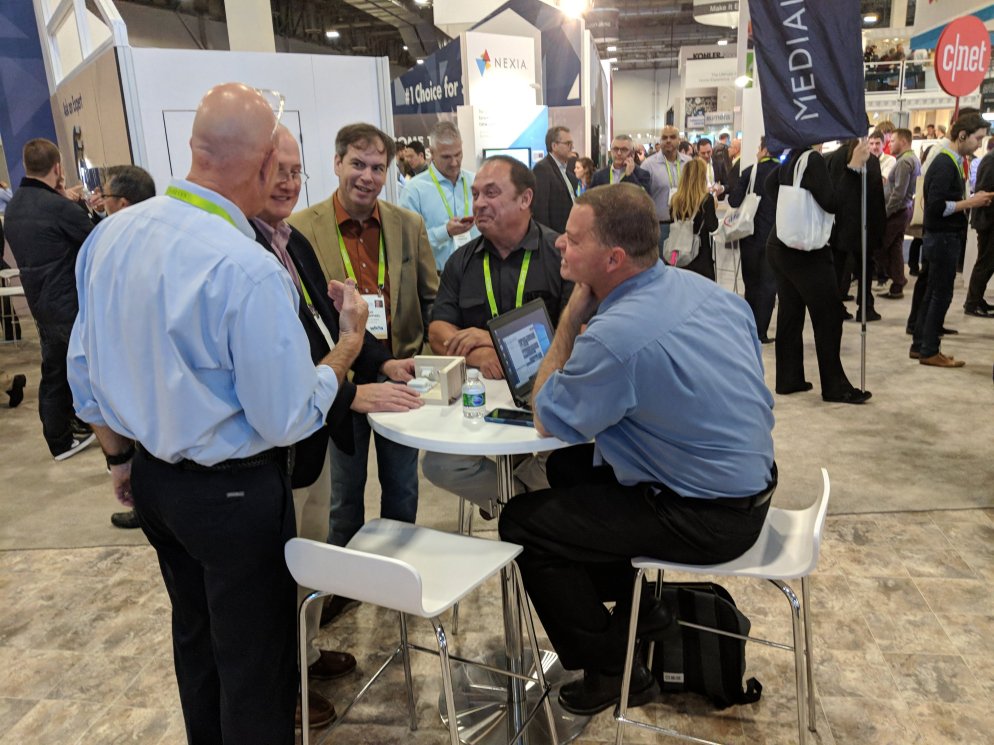
My purpose is obviously to seek out the latest news about Z-Wave and chat with my clients. The Z-Wave Alliance invited me to man the “Ask the Expert” desk at the show for a few hours which I was happy to do. My expert knowledge of Z-Wave answered simple questions like “what’s Z-Wave?” (It’s like wifi but low power) to complex questions about the rules around Security S2 and SmartStart.

The most common question is always what’s the difference between Z-Wave and Zigbee? My short answer is that Zigbee is like silos. If you can develop an app, gateway and all the devices you need, then Zigbee will work OK. Z-Wave however was a mesh network from day one and every Z-Wave device can talk to every other Z-Wave device regardless of the manufacturer. Z-Wave is built around standardized command classes so every hub knows precisely what format a temperature sensor is sending the data. Is it in celcius or Fahrenheit? Tenths of a degree or hundredths? With Z-Wave, the format is fully specified. The other protocols let you decide the format which is fine if you have the huge budget to do it all. But if your investors have you on a shoestring budget then Z-Wave is the way to go. I have much longer answers to the Z-Wave vs. Zigbee question but much too long to keep your interest in a quick blog post.

The big announcement for Sigma (other than the acquisition by Silicon Labs) is the announcement of the 700 series. Unfortunately details remain shrouded in secrecy but Sigma has put a stake in the ground of having developers kits by summer 2018. Finally having a real 32 bit ARM processor will be a huge productivity improvement for us IoT developers.

I had limited time to walk the floor but it does seem that smart home has finally taken off. There are so many companies making cool gizmos it’s overwhelming. From sun tracking solar powered umbrellas to cameras of every size and resolution to lots of new hubs there is no way one person can take it all in. You’ll just have to see for yourself.

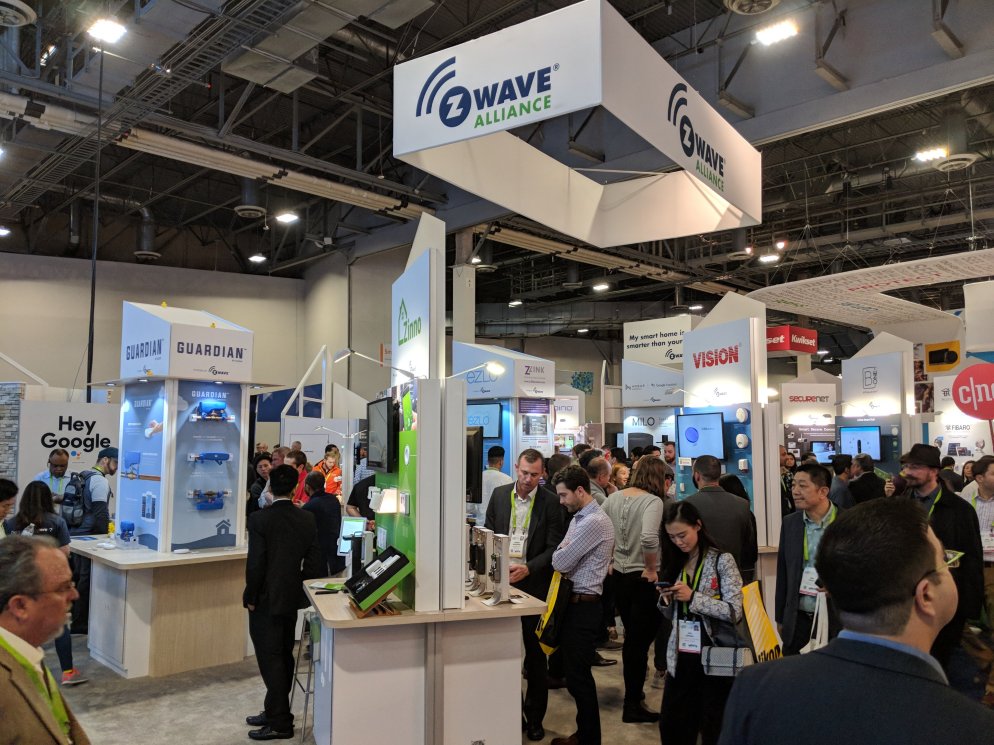
The Z-Wave Alliance booth is even bigger this year filled with companies hawking the latest IoT thingamagiggy using Z-Wave. Every one of them able to talk to all the other Z-Wave doodads. The booth was busy all day long. I did wander past the tiny Zigbee booth buried in the back of the hotel with a few people in it but nothing like Z-Wave.

SiLabs acquires Z-Wave – Good or Bad?

On Friday of last week Silicon Labs signed an agreement to purchase Sigma Designs for $282M.

The question is: is this good for Z-Wave or bad? 

logoSilicon Labs is a well respected semiconductor manufacturer with an array of microcontroller products  from 8-bit 8051s thru modern low-power ARM CPUs. Silicon Labs has been chasing the IoT market since before IoT was a “thing”. Their low power micros have industry leading features often integrating the latest connectivity solutions like USB, Zigbee and now Z-Wave.  With a market cap of nearly $4B, Silicon Labs (SLAB) has a lot more financial muscle than Sigmas (SIGM) mere $265M could provide. All Z-Wave licensees should rejoice that a much larger company is now  supporting Z-Wave with the accompanying increase (we hope) of resources.

sigma-logoIn my opinion, the most interesting part of the announcement is that SiLabs is buying Z-Wave and not Sigmas primary business of Set-Top-Box processors. The announcement states: “Sigma Designs is in active discussions with prospective buyers to divest its Media Connectivity business”.  The announcement goes on to say that if Sigma can’t unload its “Media Connectivity business” then SiLabs will buy just the Z-Wave portfolio for $240M thus making the rest of Sigma worth only $42M assuming someone is willing to pay that much for it.
The Past

logo_zensyszwaveZ-Wave was originally invented by Zensys based in Copenhagen Denmark in 1999. Originally the Z-Wave protocol used Chipcon radios (acquired by TI) and Atmel processors (acquired by Microchip). In 2003 Zensys announced its own custom designed “100 series” Z-Wave transceiver which was a complete Z-Wave capable IoT System-On-Chip. In 2008 Zensys was struggling financially.  Fortunately Sigma stepped in an purchased Zensys for an “undisclosed amount”. Nine years later, Sigma has sold Z-Wave for a very nice ROI of perhaps 100X. Mergers and acquisitions in the semiconductor industry are frequent as technology and markets shift in unforeseen ways.
The Present

Z-Wave is growing like crazy as the number of 100% inter-operable mesh networked Z-Wave devices on the market continues to increase. There are now over 600 Z-Wave licensees with over 2100 products already on the market. With the recent addition of the AES-128 encrypted Security S2 communication and SmartStart to simplify the building of the Z-Wave network, Z-Wave shows it is continuing to evolve while still being completely backwards compatible with all the existing devices all the way back to the 100 series.

The Future

The future is nearly impossible to predict. I certainly don’t claim to have a clearer crystal ball than the next guy. But this acquisition bodes well for the future of Z-Wave. The additional resources should accelerate the introduction of the ARM Z-Wave microcontrollers which in turn will bring more Z-Wave products to market faster and cheaper. The soon to be announced next generation transceivers are expected to utilize modern ARM processors and make a significant leap forward in debug capabilities that are not present in the current 8051 8-bit CPUs. Z-Wave developers will finally be able to single step through their code instead of relying on printf to output a few cryptic characters giving you meager clues where your code has gone wonky.

Conclusion

The acquisition of the Z-Wave portfolio by a financially strong IoT silicon manufacturer is a “good thing” for the future of Z-Wave.

How to make a Z-Wave SUPER Sniffer

In this posting I’ll show how I made not just a Z-Wave packet sniffer but a SUPER Z-Wave packet sniffer that is able to receive many Z-Wave frames that a mere average sniffer cannot.

If you are a Z-Wave developer there is a packet sniffer tool available with the Z-Wave development kit called the “Zniffer” that is similar to the popular WireShark network sniffer. Unfortunately for the average Z-Wave user, the tool is only available to developers which requires the purchase of a DevKit and signing the applicable NDA documents. The Zniffer software is available on the Sigma Technical Support Site (ZTS) which requires an account approved by Sigma so you have to prove you are a developer. The Zniffer is invaluable for developing with Z-Wave because it decodes and can decrypt the encrypted frames traveling over the radio. The Zniffer is able to capture every routing attempt and every acknowledge as well as FLiRS beams and even collisions on the radio. This is way more information than you can get via the SerialAPI and is the only way to diagnose many problems you will encounter while developing a Z-Wave based product.

How to make a Super Zniffer

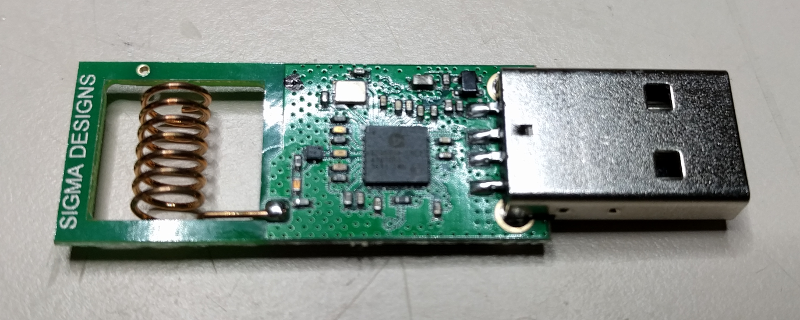
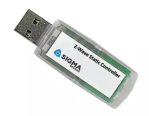
You can’t buy a Zniffer. UZBYou have to make one out of a UZB which is a simple USB stick that provides a COM port that talks to a PC over USB. The ZTS site explains how to convert a UZB into a Zniffer which isn’t easy to do and every time I do it I seem to have about a 1 in 5 chance that I permanently brick the UZB and have to just throw it away (fortunately they are only $25). Once you have the Zniffer firmware loaded into the UZB, use the Zniffer software and make sure it’s working. The UZB works well however it has a tiny helical antenna which means it is limited in its ability to capture all the traffic over the radio. The key to making a Super Zniffer is to tear out the little helical antenna and replace it with a full 1/4 wave antenna.

Solder on an SMA connector

ZnifferThe first step is to pry open the UZB enclosure. Use a small flat head screwdriver to pry it open along the USB connector. There are pins that hold the two halves together. Be careful not to break off the pins as we’ll use the enclosure with the Zuper Zniffer.
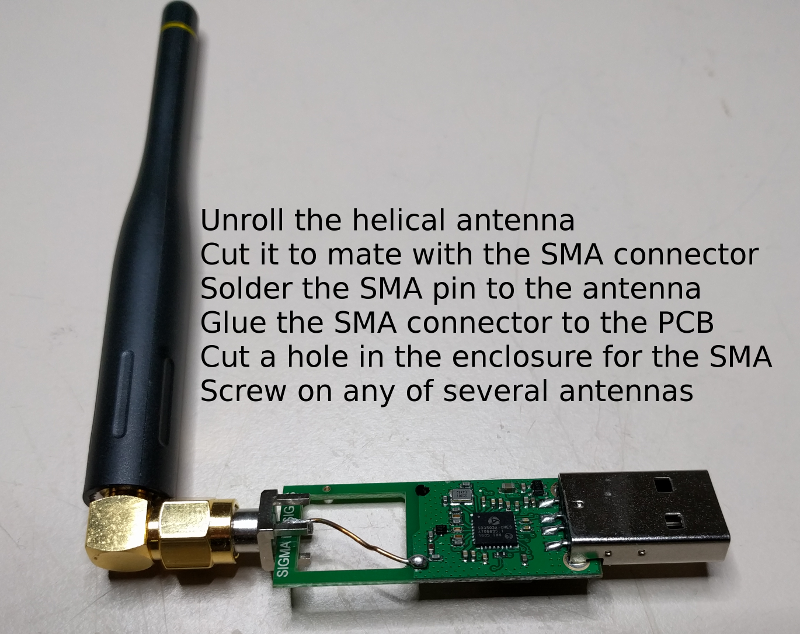
SuperZnifferNext unroll the helical antenna and cut it off so it just reaches the end of the PCB. Place the SMA connector on the end of the PCB and solder the antenna wire to the center pin of the SMA as shown above. You can solder the ground pin of the SMA to the PCB ground but it doesn’t seem to make much of a difference. Cut the enclosure to make room for the SMA connector to stick out the end and then snap it back on. Then screw on any SMA antenna and try it out. I typically get 3 to 5 more dB as reported in the Zniffer software RSSI column. This should be nearly 10X more range. There are so many antennas to choose from once you have an SMA connector so experiment and find one that works for you. You can even use a Yagi antenna which would then make the Zniffer highly directional.
Comparing the Zniffer to the Super Zniffer

A regular Zniffer and even the Super Zniffer won’t capture EVERYTHING traveling over the radio waves. That is just the nature of RF. When analyzing the trace in the Zniffer you have to remember that you might be missing frames that your target can see AND that even though you can see a frame it is possible the target didn’t see it. Thus, analyzing the Zniffer trace takes some getting used to.

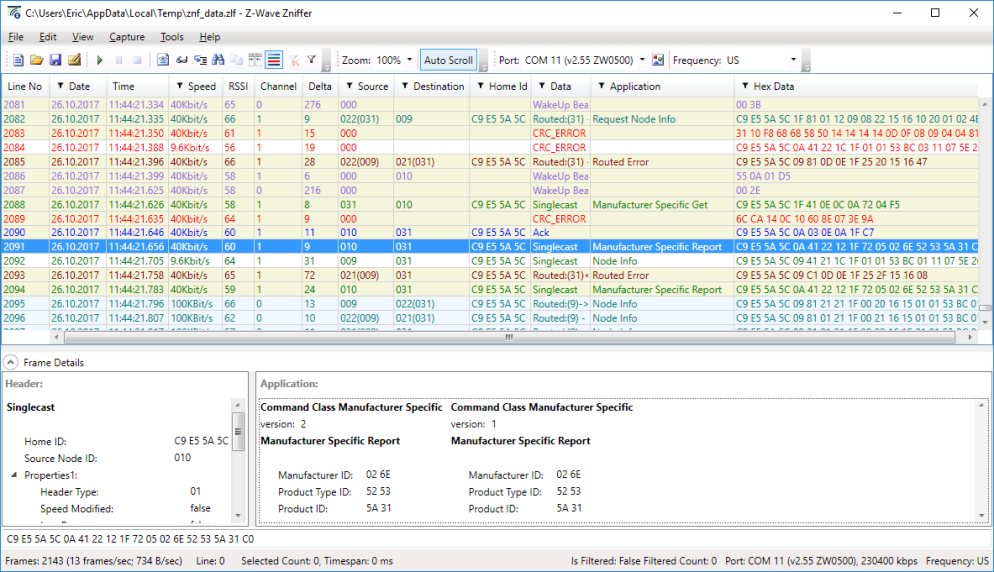
Here is a typical Zniffer trace:

ZNif1

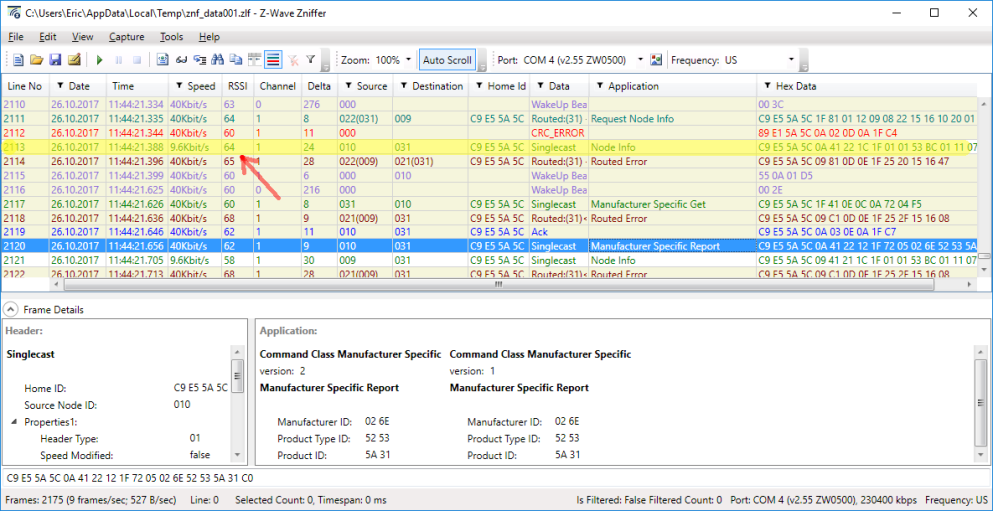
And this is the Super Zniffer trace of the same time when both Zniffers are right next to each other. Compare line 2084 above (the 2nd red CRC ERROR line) and line 2113 below.

SuperZnif2

Notice the yellow highlighted line on the Super Zniffer trace. If you compare this line with the one from the normal Zniffer you see the normal Zniffer only recorded this frame as a CRC error and was not able to capture it correctly. Also note that the RSSI is only 56 compared to 64 for the Zniffer indicating the antenna is providing about 8dB more signal strength than the tiny helical antenna of the normal Zniffer. The improved reception of the Super Zniffer makes debugging Z-Wave problems much easier as you aren’t having to sort thru as many questionable frames.


Z-Wave Summit 2017 at Jasco in Oklahoma City

“IoT Device Testing Best Practices” by Eric Ryherd

Summit1Click HERE to see the entire presentation including my notes. If you are a Z-Wave Alliance member a video of the presentation is usually posted on the members only section of their web site. The main takeaways from my presentation are:

  • Have a written test plan
  • Use the Compliance Test Tool (CTT) as the START of your test plan
  • Vary the environmental conditions during testing
  • Test using real world applications
  • Test using complex Z-Wave networks with routing and marginal RF links
  • Test with other hubs and devices
  • Automate testing using tools like the ZWP500
  • Code firmware with failure in mind
  • Utilize the WatchDog timer built into the Z-Wave chip

ZWaveSummit2017aThe presentation goes into detail on each of these topics so I won’t duplicate the information here. I also go thru several failures of devices I’ve been working with. You learn more from failures than you do when everything just works. Feel free to comment and let me know what topic you’d like to see for next years summit.

Z-Wave Summit Notes

One of the main purposes of the summit is to learn what’s new in Z-Wave and what Sigma is planning for the future. The most important news at this year’s summit is SmartStart. The goal for SmartStart is to simplify the user experience of installing a new device on a Z-Wave network. The concept is that a customer will open the package for a device, plug it in, the hub is already waiting for the device to be joined and the device just shows up on their phone without having to press a button or enter the 5 digit pin code. This is a “game changer” as Sigma pointed out many times during the summit. Typically a user has to put their hub into inclusion mode, read the product manual to determine the proper button press sequence to put the device into inclusion mode, wait for the inclusion to go thru, write down the NodeID number, with an S2 device they have to read the teeny-tiny 5 digit PIN code printed on the product (or scan the QR code) and then MAYBE the device is properly included. Or more often, they have to exclude and retry the process all over again a couple of times. SmartStart as you can see will make the user experience much easier to get started with Z-Wave.

SmartStart enables “pre-kitting” where a customer buys a hub and several devices as a kit. The hub and the devices in the kit are all scanned at the distribution warehouse and are all white listed on the hub web site. When the customer plugs all the devices in, they automatically join and all just magically show up ready to be used without the frustration of trying to get all the devices connected together. Unfortunately there are no devices that support SmartStart and there are no hubs that support it either – yet. We’ll get over that eventually but I suspect it’ll take a year before any significant numbers of SmartStart supported devices show up on Amazon.

SmartStart is enabled in the SDK release 6.81 which occurred during the summit. There are some other handy features in this release. The main new feature (after SmartStart) is the ability to send a multi-cast FLiR beam. One problem with FLiR devices is that they are all sleeping devices and briefly wake up once per second to see if someone wants to talk to them. Prior to 6.81 you had to wake up the devices one at a time and each one would take more than one second to wake up. If you have battery powered window shades like I do, there is a noticeable delay as the shades start moving one at a time instead of all together. Both the shades and the remote (or hub) will need to be upgraded to 6.81 before we can use this new feature. That means it’ll be again probably another year before this feature is widely available, but it’ll get there eventually.

There are rumors that Sigma will be announcing a new generation of the Z-Wave transceiver chip in early 2018. I am hoping it will will finally include the upgrade from an 8-bit 8051 CPU to a more capable 32-bit ARM CPU.  The current 500 series relies on the ancient 8051 with very limited debugging capabilities which significantly slows firmware development. With an ARM CPU developers like Express Controls will find it easier to hire engineers who can code and debug firmware and thus we’ll be able to bring more Z-Wave products to market in less time.

A new web site, Z-WavePublic.com, has been populated with the Z-Wave documentation as well as images for the Beagle Bone Black and Raspberry Pi loaded with Sigmas Z/IP and Z-Ware. With one of these boards and a USB Z-Stick anyone can start developing with Z-Wave without having to sign a license agreement. Nice way to get started with Z-Wave for you DIY nerds out there. There were many other presentations on Security S2, Certification, The CIT, Z/IP, HomeKit and many other topics on the technical track of the summit. The marketing track had a different set of presentations so I recommend sending both a technical person and a marketing person to the summit.

Summit isn’t all work, work, work

IMG_20170927_090355The Summit isn’t all work all day though the days are long and tiring. Tuesday evening was a reception at Coles Garden which is a beautiful event venue. Unfortunately it was raining so we couldn’t wander thru the gardens much but Mitch, the Alliance Chairman, kept us entertained.

Wednesday evening was the Members Night at the Cowboy museum. Oil profits made a lot of wealthy Oklahomans who were able to make sizable donations to this huge museum. There is a lot more to see than we had time to explore so I’d recommend spending more time here if anyone is visiting Oklahoma City. Lots of food and drink made for an ideal networking environment with your fellow Z-Wave developers.


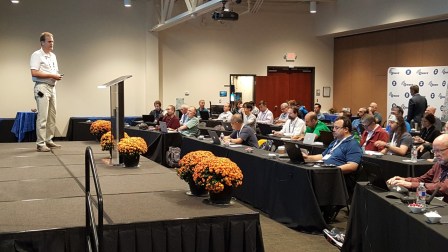
Eric Ryherd Presenting “IoT Device Testing Best Practices” at Z-Wave Summit in Oklahoma City September 26-28, 2017

Z-Wave Developers and Marketers will come together at the Z-Wave Summit at the Jasco facility in Oklahoma City September 26-28, 2017. You have to be a member of the Z-Wave Alliance to attend. I highly recommend attending if you are developing Z-Wave devices . Networking with other Z-Wave developers and having intimate access to the Sigma Design and Alliance engineers and marketing folks is invaluable. To attend, register via the Alliance member-only web site. The Alliance always has some fun in the evenings too so it’s not all work!

Eric Ryherd Presenting

Express Controls founder and Z-Wave expert Eric Ryherd (aka DrZWave) will be presenting at the summit for the 4th consecutive year. Last years presentation was “Seven Things you probably don’t know about Z-Wave” and was well received. I was surprised how many engineers were completely unaware of the many new features and command classes that have been added to Z-Wave in the past couple of years. This year’s topic is “IoT Device Testing Best Practices“. I’ll go over some of the failures I’ve found over the last several years in both my products and other products I’ve tested.

Abstract

Z-Wave wireless Internet of Things (IoT) devices are hard to test! There are countless devices already in customers hands with bugs in them that make Z-Wave seem unreliable when in fact many of the issues are bugs in the device firmware.  Eric Ryherd, Z-Wave expert and consultant, describes some of the  failures that are still shipping today and best practices when testing your IoT device to reduce the chance your device fails in your customers hands. Simple command sequences sent one at a time by a test engineer is not representative of the real world packet storms that occur in an apartment building with complex RF reflections and multiple interfering RF networks. Your device has to work in the real world and to do that you need to simulate those terrible conditions that do not happen on the engineers desk.

Author Bio

Eric Ryherd licensed Z-Wave in 2003 to develop IoT devices before the term IoT even existed. Light switches, motion & temperature sensors, water valves and meters, hubs, window shades, remote controls are just a sample of the Z-Wave IoT devices developed and tested by Express Controls. Eric applies his Z-Wave expertise in consulting, training and assisting with Z-Wave Certification to companies of all sizes. Read more by Eric at his blog – DrZWave.blog.

10 Questions when Reviewing Embedded Code

Design News posted a great article “10 Questions to Consider When Reviewing Code” and I’m just posting the list here. Follow the link for the full article with the details behind each question.

  1. Does the Program build without warnings?
  2. Are there any blocking functions?
  3. Are there any potential infinite loops?
  4. Should this function parameter be a const?
  5. Is the code’s cyclomatic complexity less than 10?
  6. Has extern been limited with a liberal use of static?
  7. Do all if…else if… conditionals end with an else? And all switch statements have a default?
  8. Are assertions and/or input/output checks present?
  9. Are header guards present?
  10. Is floating point mathematics being used?

My personal pet peeve is #3 – I am constantly reviewing that uses WHILE loops waiting for a hardware bit to change state. But what if the hardware bit is broken? Then the device is DEAD. Always have some sort of timeout and use a FOR loop instead of a WHILE loop. At least the code will move on and won’t be dead. Maybe it won’t work properly because of the broken hardware but at least the device can limp along.

How to support Over-The-Air (OTA) firmware update now that Micron has End-Of-Lifed the NVM Z-Wave needs

Sigma Designs Z-Wave chips rely on an external non-volatile memory (NVM) to store the routing tables and other data that needs to survive a power-loss. Unfortunately, Sigma chose an NVM that is single-sourced and what is even more unfortunate is that the source, Micron, has decided to End-Of-Life (EOL) the part in March of 2018. Semiconductor companies like Micron regularly EOL parts as technology moves on so I can’t fault them for that. Micron  gave plenty of warning as the EOL notice went out in 2013 giving you 5 years to prepare for the end. I and many other Z-Wave manufacturers didn’t realize the EOL until a couple of months ago when the NVM became out-of-stock at virtually all distributors! This shut down production lines and we were unable to build product! A potentially company killing event. Fortunately Micron was able to restock and we were able to ship product with only a slight delay. This temporary unavailability raises the critical nature of finding a replacement soon.

What are the Z-Wave NVM options?

Before deciding which NVM to use, you have to decide if you want to support Over-The-Air (OTA) firmware update or not. I highly recommend OTA because Z-Wave continues to evolve and being able to update the firmware in the field is a huge advantage. OTA requires enough NVM storage to hold a complete firmware image of the Z-Wave module which is 128K bytes AND the routing tables which is roughly another 32K bytes. The firmware image can be compressed which allows you to use a 1Mbit (128K byte) NVM but the price for a 2Mbit vs. 1Mbit is tiny and in some cases the larger ones are cheaper than the smaller ones because they are on a newer silicon technology.

Without OTA use commodity EEPROM

If you decide to not have OTA, the NVM options are not affected by the EOL because for slave devices you don’t even need an NVM. Simple slaves can store small amounts of application data in the on-chip FLASH of the Z-Wave chip. This saves the cost, size and power of the external NVM so in some cases this is the best way to go. For very small battery-powered devices like a key-fob, this is the way to go.

Routing slaves or controllers require an external NVM such as the  Atmel AT25256 32Kbit EEPROM. The EEPROM is a commodity device supported by several manufacturers so there is no EOL issue with these devices. Controllers and routing slaves need to store  the routing tables in NVM which are many K bytes of data. The EEPROM devices are well suited to this task because you can write to single bytes of the EEPROM at a time. The serial FLASH chips are not able to write to single bytes which is the major problem. Gateways or other controllers with another micro on-board can update the Z-Wave firmware using either the SPI pins or the UART/USB. The code to burn the firmware into the Z-Wave chip has to be written by you or contact Express Controls and we can sell you a small package to do it.

With OTA use a single source serial FLASH

If you decide to include OTA in your product (and I highly recommend it), then your only solution is to use the Adesto Tech AT45DB0xx family of serial FLASH chips. The Sigma 500 Series Integration Guide (document number INS12213) lists only the Adesto part as the sole supported option at the moment. Sigma is actively looking for alternatives but there don’t appear to be any at the moment. The problem I have with the Adesto part is that it is only available from Adesto, there is no second source. This is a unique part and worse, it has a completely unique pinout as shown below. Using the Adesto part REQUIRES PCB RE-LAYOUT! Existing designs that have already passed FCC regulatory and Z-Wave compliance may not be able to switch to the Adesto part because of the pinout differences. The pinout of each part is shown below. The pins are completely scrambled. The signals are basically the same function but their placement is scrambled.

Z-Wave Experts consulting and IoT product development

The only solution is to put both footprints on the PCB to enable the option of purchasing whichever part is available and cost-effective.

Why doesn’t Sigma support commodity serial FLASH chips? The problem with commodity serial FLASH chips is that they require you to erase an entire sector (4096 bytes) any time you want to write even one byte of data. The Micron and Adesto parts both have Page Write capabilities where a page is only 256 bytes. Every time you write a single byte of data to the NVM the Sigma code will READ 256 bytes, erase the entire 256 bytes (which is a single SPI command), and the write the 256 bytes with the updated byte of data. Any time you write more than one byte to the EEPROM you should be using the MemoryPutBuffer command and not the MemoryPutByte. Supporting commodity FLASH chips would require reading/storing/writing 16 times more data with each write. That would slow many operations down to the point of unusability.

Comparing the NVM Parts

The Adesto part is specifically designed for IoT devices and has a number of really handy features. Specifically it has an Ultra Deep Sleep mode of only 1uA. The Adesto NVM has a wide voltage range which ensures it will work in battery-powered devices even as the battery approaches its end of life. The Sigma Z-Wave 500 series chips are able to operate down to 2.3V and the Adesto part is well below that.

The table below gives a breakdown of the options for NVM with Z-Wave. Using the on-chip FLASH for a few dozen bytes of application storage is of course the lowest cost option but limits the routing capabilities of the node. This option is ideal for Key-fobs or other very space/cost constrained devices that don’t need OTA. The EEPROM is fine for controllers that can be reprogrammed using a second micro. The Micron part is not recommended since it will soon be unavailable. The Adesto part is expensive and is single sourced and has a unique pinout but it is the only solution at the moment.

Spec None EEPROM M25PE AT45DB
PinOut NA Std Std Non-Std
OTA No No Yes Yes
Size on-chip 32Kb 2Mb 2Mb
Write 1 byte 1 byte 256 bytes 256 bytes
Vcc 2.3-3.6V 1.8-5.5V 2.7-3.6V 1.65-3.6V
Sleep 0 10uA 10uA 1uA
Cost1 $0.00 $0.32 $0.42 $0.75
Use Case Small battery powered devices like Key Fobs Controllers with second micro for firmware update OBSOLETE! Recommended

If Sigma can figure out how to work with the larger 4Kbyte sector sizes of commodity serial FLASH chips then the cost of a Z-Wave device can drop by over 50 cents resulting in a couple of dollar cheaper retail price. All Z-Wave manufacturers should be pressuring Sigma to come up with a cheaper solution.

Notes:

  1. NVM costs are 1K pricing from online distributors Q1 2017 and should be used for comparison purposes only – your results will vary